
Sourcing Management · Beginner
When the quality check fails
The inspection says the goods are not good enough. What you see, what the system stops for you, and the plain next steps until the goods pass.
Sooner or later an inspection fails: stitching is loose, the colour is off, pieces are broken. This is exactly the moment the quality check exists for. Nothing is ruined — the goods simply do not travel yet. This page shows what you see and what to do, in order.
1. The deal waits for its quality check
The goods are ordered and being made. On the deal, the quality check step is ready: one Approve records that the goods arrived from the factory and were checked.
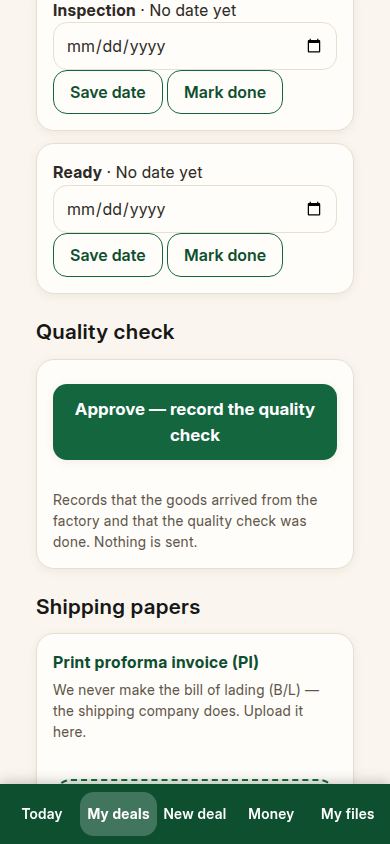
2. The check is done, and the goods do not pass
When the inspector finds the goods are not good enough, the inspection is recorded in More tools (the full desk) with the result “Rejected”. The record names the goods and the order it belongs to. A failed check is a stored fact, like any other — it is not an opinion in somebody’s inbox.
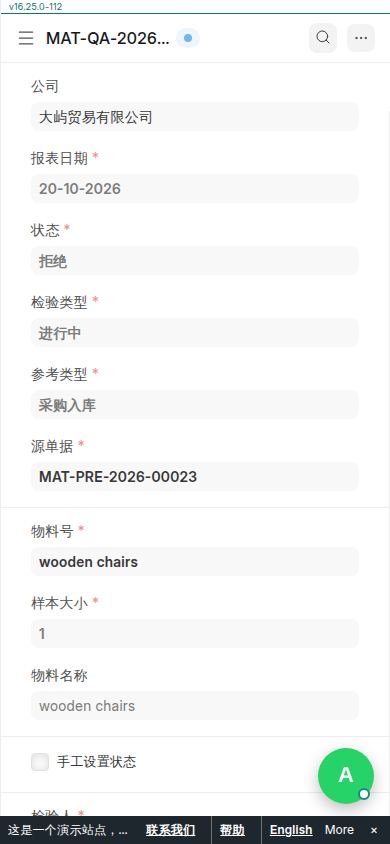
3. Your deal says so, in plain words
Open the deal. It does not quietly carry on. It says: “The quality check did not pass. Do not send these goods to the client. Talk to the factory, fix the problem, and check the goods again before they leave.” The button that sends the goods is replaced by that same advice until a newer check passes.
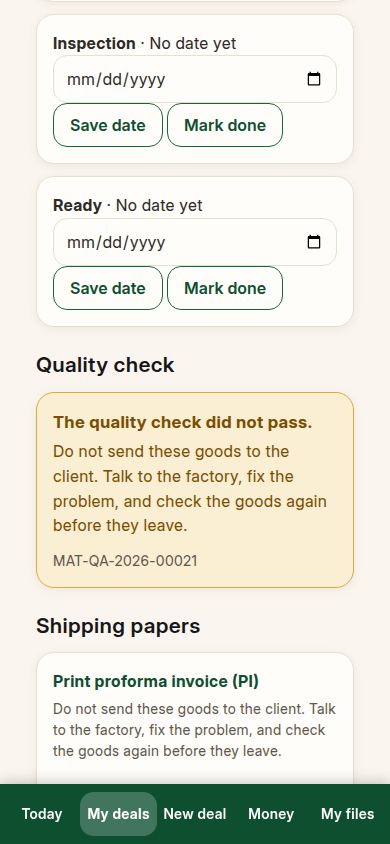
4. The system stops the goods for you
Goods that failed are not received into your stock, so they cannot be shipped by accident. The order stays open, the client is told nothing yet — what the client hears is your words, when you are ready.
5. Agree the fix with the factory
Send the factory the inspection record and agree what happens: repair the goods, remake them, or replace the bad pieces. Put the new date on the deal’s production steps, so the lateness is visible in words while you wait.
6. Check again, then carry on
When the fixed goods are ready, record the new check. When it passes, the deal goes back to normal: the warning clears, the goods can be received and shipped, and the deal finishes like any other. Both checks stay on the record — the fail and the pass — so the story of the deal is complete.
If something looks different
If your inspection is recorded by an outside inspector, the result is still typed into the same record — the deal page only reads the stored result. If you think a check was recorded against the wrong order, do not delete anything: open the record in More tools, and if it is truly wrong, cancel it there and record the right one; the deal page follows the newest finished check. And if the factory disputes the result, the record is your shared ground truth — start the conversation from it, not from memory.
Related pages
-
From the first question to the money
One whole real deal, start to finish: ask, get prices, offer, client says yes, both orders, production, quality check, shipping papers, delivered, earnings. Every step with its real screen.
-
Sending part of the goods first
Only part of the order is ready: 8,000 of 20,000 pieces leave first. How to record it, how the remaining balance is shown in words, and how the second shipment closes the deal.
-
ClearDesk: the whole deal on your phone
ClearDesk runs a whole sourcing deal from your phone in plain words: prices, the client offer, both orders, production, the quality check, shipping papers and money. Nothing is ever sent until you press Approve.
Still have a question?
Ask the PHOENIX assistant in the chat at the bottom right, or send us a message. We reply within one business day.
