
Part 11 · How PHOENIX supports you
My account
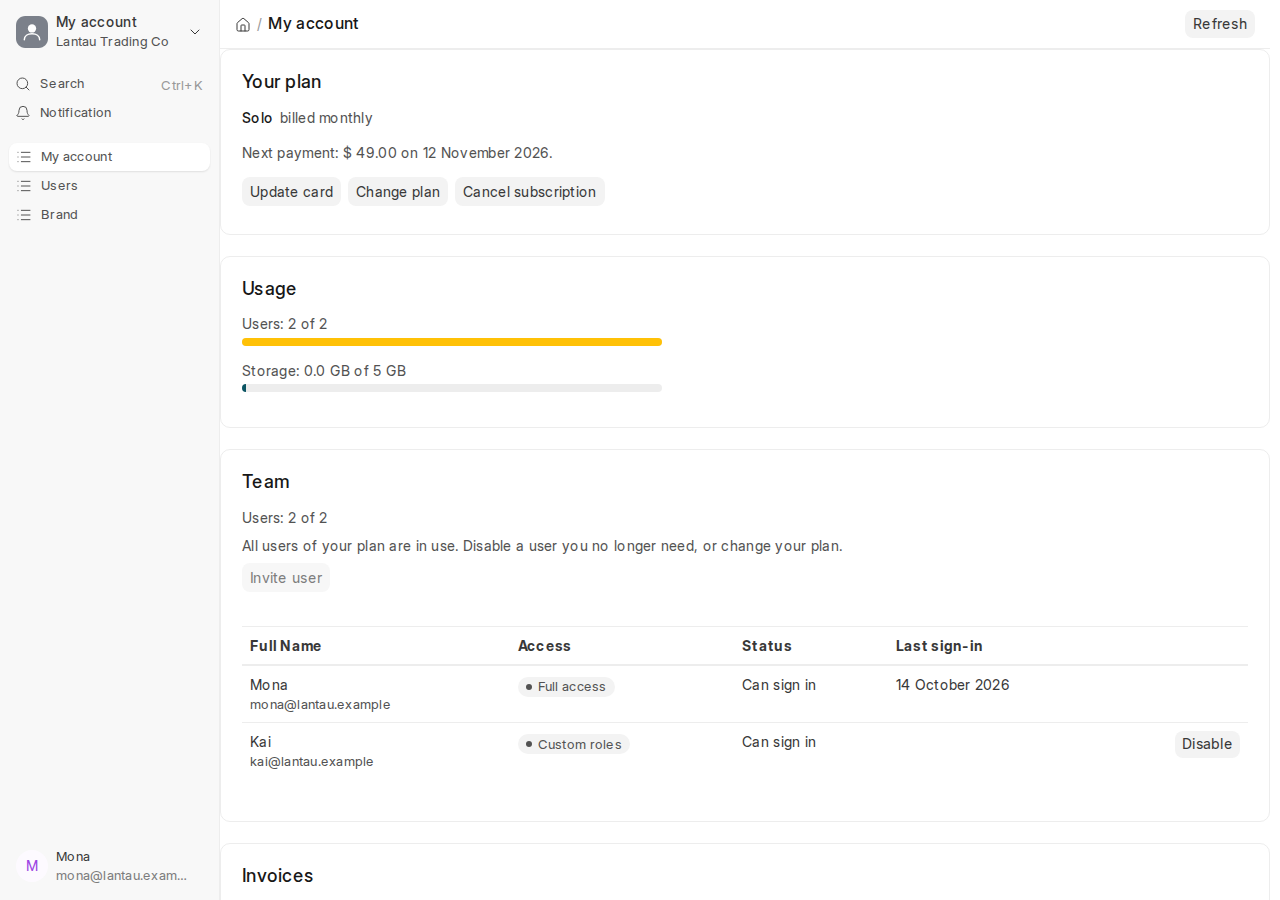
Your plan, usage, team, invoices, data export, brand and closing your account, on one page in your site.
What it is
My account is the page in your site for the account’s owners: the users with the System Manager role. Open it from your name at the top of the desk, or from the My account tile, last on the desk’s home. It has these cards:
| Card | What it shows |
|---|---|
| Your plan | Your plan and billing, the trial’s end or the next payment, a waiting plan change. Update card, Change plan and Cancel subscription open the billing page in a new tab |
| Usage | Users and storage, each against your plan’s limit |
| Team | Your users, their access and last sign-in. Invite user, Disable and Enable |
| Invoices | Your invoices with View and PDF |
| Your data | Export all my data: one zip file of everything in your site |
| Brand | Your brand name. Edit brand opens your branding page |
| Close account | Close your account and what happens then |
The plan, payments and invoices come from our billing system and are kept for 5 minutes. Refresh, at the top, reads them again.
Why it matters
Everything about your account is in one place, in your own site, in your language. You do not need another login.
Steps
To invite a colleague:
- On the Team card, select Invite user.
- Type their Email Address and First Name and choose a Role Profile.
- Select Send invitation. They get an email with a link to choose their password.
When your plan’s users are all in use, Invite user is off: disable a user you no longer need, or change your plan.
Common mistakes
- Looking for My account as a Sourcing Manager or Agent. Only System Managers see it.
- Expecting a change on the billing page to show at once. Select Refresh.
Tips
- Billing, under your name, opens the billing page directly.
- See Add your team for the role profiles.
Related pages
-
Invoices and your card
See and download your invoices, and change the card your plan is paid with.
-
Add your team
Give each colleague their own login: an email address and a role profile, Sourcing Manager or Sourcing Agent.
-
Export, cancel or close your account
Take a copy of all your data, stop paying at the end of the period, or close the account for good.
